
The Restaurant POS Built for Africa
Trusted by restaurants for over 10 years with zero data loss. Mobile Money payments, tax compliance, real-time analytics, remote access, and CCTV order overlay. Now available as Cloud POS or On-Prem — you choose.
Lightning Fast Orders
Keyboard First UI — Place orders in 3 keystrokes and less than 15 seconds. Perfect for peak traffic at high velocity restaurants.
Tax & Fiscal Compliance
Full fiscal compliance for Kenya, Zambia, Nigeria, and UAE. Receipts signed and submitted in real-time. Modular tax engine works in any country.
M-PESA Built In
Accept M-PESA payments via KopoKopo integration. Buygoods transactions reconcile automatically with your POS orders.
Choose Your Deployment
Two ways to run Moneta Pay POS. Same powerful features, different infrastructure.
Cloud POS
NewZero maintenance, instant setup
- No server hardware needed
- Live in under 5 minutes
- Free tier — no credit card required
- Monthly billing from KES 0
Best for: Small cafes, new restaurants, food trucks
On-Prem POS
ProvenFull control, works offline
- Works without internet
- Full fiscal compliance (KRA, ZRA, FIRS, FTA)
- Data stays on your premises
- Mobile Money reconciliation
Best for: Established restaurants, multi-branch, compliance required
Explore On-Prem POSCompare deployments
CloudFrom Free | On-PremFrom KES 2,500/mo | |
|---|---|---|
| Setup time | ~5 minutes | 1–2 hours |
| Internet required | Always | No |
| Fiscal compliance | — | Full (KRA, ZRA, FIRS, FTA) |
| Server hardware | None needed | Required |
| Data location | Cloud | Your premises |
| Offline operation | — | Yes |
| Mobile Money payments | — | Built in |
| Best for | Small cafes, startups | Established restaurants |
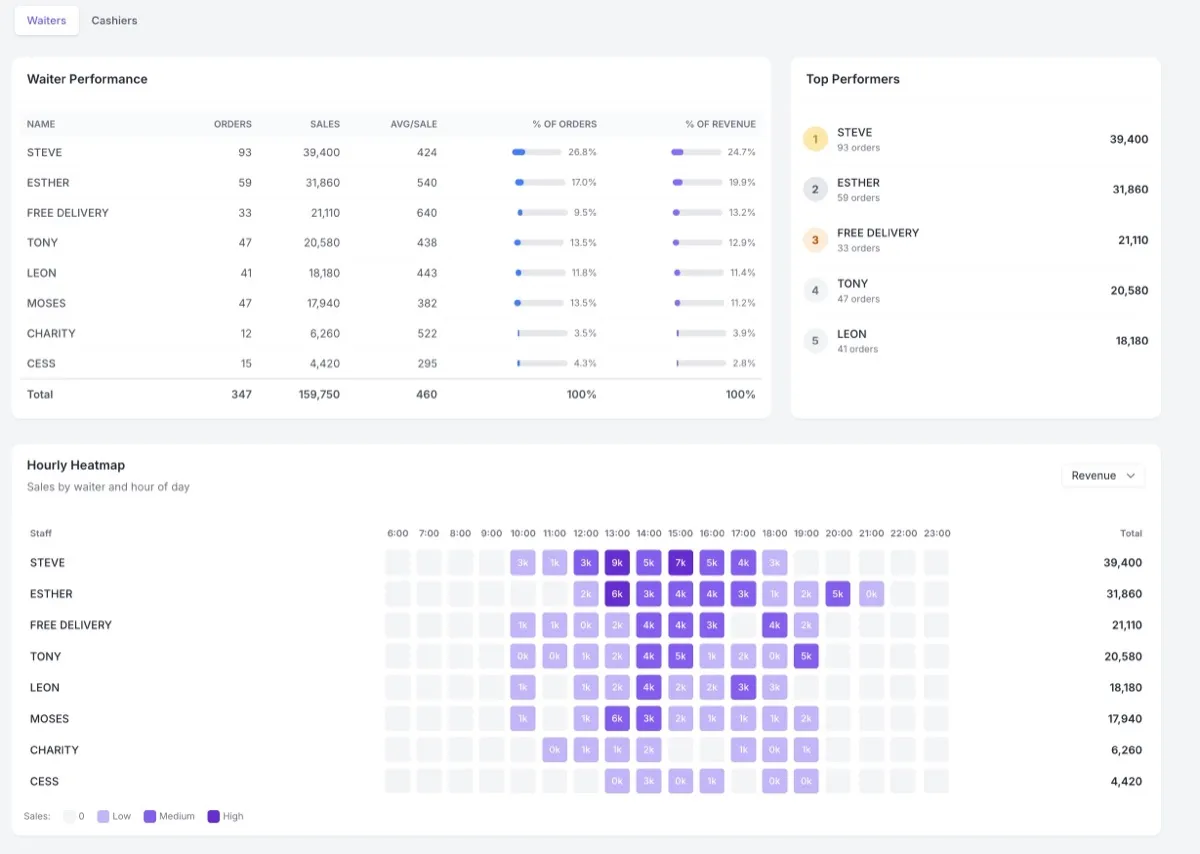
See Every Staff Member's Performance in Real Time
Track orders per staff member per hour. Spot who's selling, who's slacking, and when your rush hours hit — over any date range you choose.
" We can see exactly which staff member is productive during lunch rush and who needs more training. The analytics changed how we manage our team. "
Orders per Hour
Track every staff member's order throughput hour by hour. Spot peak performers and identify who needs support during rush hours.
Revenue Breakdown
Revenue per staff member, per terminal, per hour. Filter by any date range to see exactly where your money comes from.
Printed vs Dropped
See which orders made it to the kitchen and which were cancelled. Full visibility into your order pipeline.
Void Audit Trail
Every void is logged with who, when, and why. No more unaccounted losses — complete accountability.
Hourly Heatmap
Visual heatmap shows sales intensity by staff member and hour. Instantly see when your restaurant is busiest.
Date Range Reports
Pull reports for any date range — today, this week, last month. Export or view right in the dashboard.
Know Exactly What You Used — Automatically
Our smart stock engine uses pattern matching to auto-calculate ingredient consumption from every sale. Sell a "Chicken Curry"? The system knows that's 0.25 of a whole chicken, a portion of rice, and a measure of spices. No manual counting. No guesswork.
Everything Your Restaurant Needs
From the front counter to the kitchen — every feature designed for how restaurants actually work.
Front of House
- Table management & wait staff assignment
- Order modifiers (cold/hot, accompaniments)
- M-PESA payments via KopoKopo integration
- Customer receipts with fiscal signature (KRA eTIMS, URA)
- Float system (track cash per staff member)
- Card & M-PESA subscription billing
Back of House
- Smart stock engine (regex-based auto-calculation)
- Kitchen ticket routing (separate printers per station)
- Wait staff analytics (orders/hour, revenue, gap detection)
- Void audit trail (who voided, who originally sold)
- CCTV order overlay (Dahua camera integration)
- Remote access via secure WireGuard VPN
- Managed nightly S3 backup with point-in-time recovery
- Market intelligence & supplier benchmarks
Trusted by Restaurants Across East Africa
From single-outlet cafes to multi-branch chains, Moneta Pay POS powers restaurants that serve thousands of customers every day.

"We've been running Moneta Pay POS for over 10 years now. The wait staff analytics alone have helped us cut idle time by 30%. We can see exactly who's performing and who needs support. The system just works — even when our internet drops."

"During our lunch rush on Tom Mboya, speed is everything. Our cashiers place orders in seconds using keyboard shortcuts. The M-PESA reconciliation saves us hours every week — we used to match payments manually."

"Managing three branches used to mean driving between locations. Now I check sales, expenses, and staff performance from my phone. The void audit trail gives us complete accountability."

"As a specialized concept under the Olive brand, we needed a POS that could handle our unique menu while keeping the same reporting standards across all locations. Moneta Pay does exactly that — one system, consistent data, easy to train new staff."

"The kitchen ticket routing is flawless. Orders go to the right station every time. And the expense tracking helps us monitor our food costs daily — we can spot price changes from suppliers immediately."
Frequently Asked Questions
What hardware do I need?
Moneta Pay POS works on any Windows or Linux PC. No special hardware required. We support standard ESC/POS thermal printers over TCP/IP for receipts and kitchen tickets.
What payment methods do you accept?
Pay for your licence with credit/debit card or M-PESA. Card payments support auto-renewing subscriptions so your licence never lapses. M-PESA payments are one-time per billing period.
Do you support tax and fiscal compliance?
Yes. Full fiscal compliance for Kenya (KRA eTIMS), Zambia (ZRA), Nigeria (FIRS), and UAE (FTA). Invoices are auto-submitted and receipts digitally signed in real-time. Our modular tax engine can be configured to match any jurisdiction's requirements.
Can I manage my restaurant remotely?
Yes. The Remote Access VPN add-on creates a secure WireGuard tunnel to your POS. Monitor sales, manage menus, check reports, and troubleshoot from your phone, laptop, or tablet — anywhere in the world.
What happens when my licence expires?
We send renewal reminders 7 days and 1 day before your licence expires. After expiry, you get a 7-day grace period to renew. After that, the system enters limited mode — orders continue working but the dashboard and reporting are disabled. Renew anytime to restore full functionality. Card subscriptions auto-renew so you never have to worry.
What if my internet goes down?
Moneta Pay POS is designed to work offline. Orders, payments, and printing continue without interruption. Data syncs automatically when your connection is restored. Optional managed backup provides nightly S3 disaster recovery.
Can I manage multiple branches?
Yes. The Enterprise plan supports multi-branch management with centralized licensing, per-branch data isolation, and cross-branch reporting. Access all your dashboards remotely via secure VPN connectivity.
How do I get support?
We offer 24/7 support via phone and WhatsApp on Pro and Enterprise plans (business hours on Starter). Free onboarding and training included. Our team is based in Kenya and understands local restaurant operations.
Cloud or On-Prem — You Choose
Start your restaurant POS journey today.
Cloud POS is free to start. On-Prem includes a 21-day full-experience trial.